Dithering tricks your eyes into seeing detail that isn't there. With only two states — on or off, black or white — it arranges dots in patterns that your brain reads as smooth gradients, subtle shading, and tonal depth.
It is one of the oldest ideas in image making, and one of the most useful in computing.
Artistic Roots
In the renaissance period, artists only had two colors, black ink, and white paper. Yet they created detailed imagery using engraving and hatching techniques. Artists like Albrecht Durer used hatching and cross-hatching; drawing parallel lines tightly packed or separated to simulate shading.
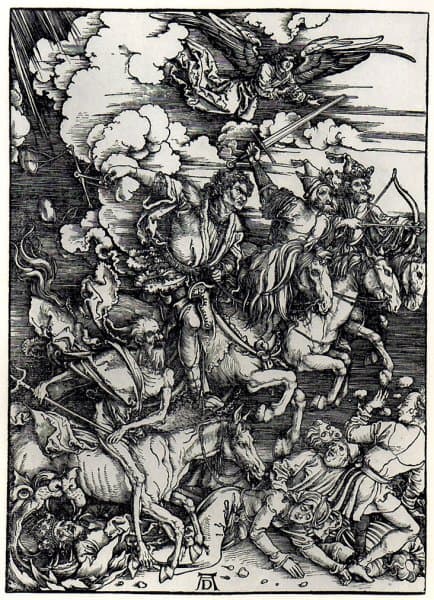
In the 1500s artists used dots were used instead of lines. Dense cluster of dots resulted in dark areas, and sparse dots resulted in lighter areas. This technique was called stippling.
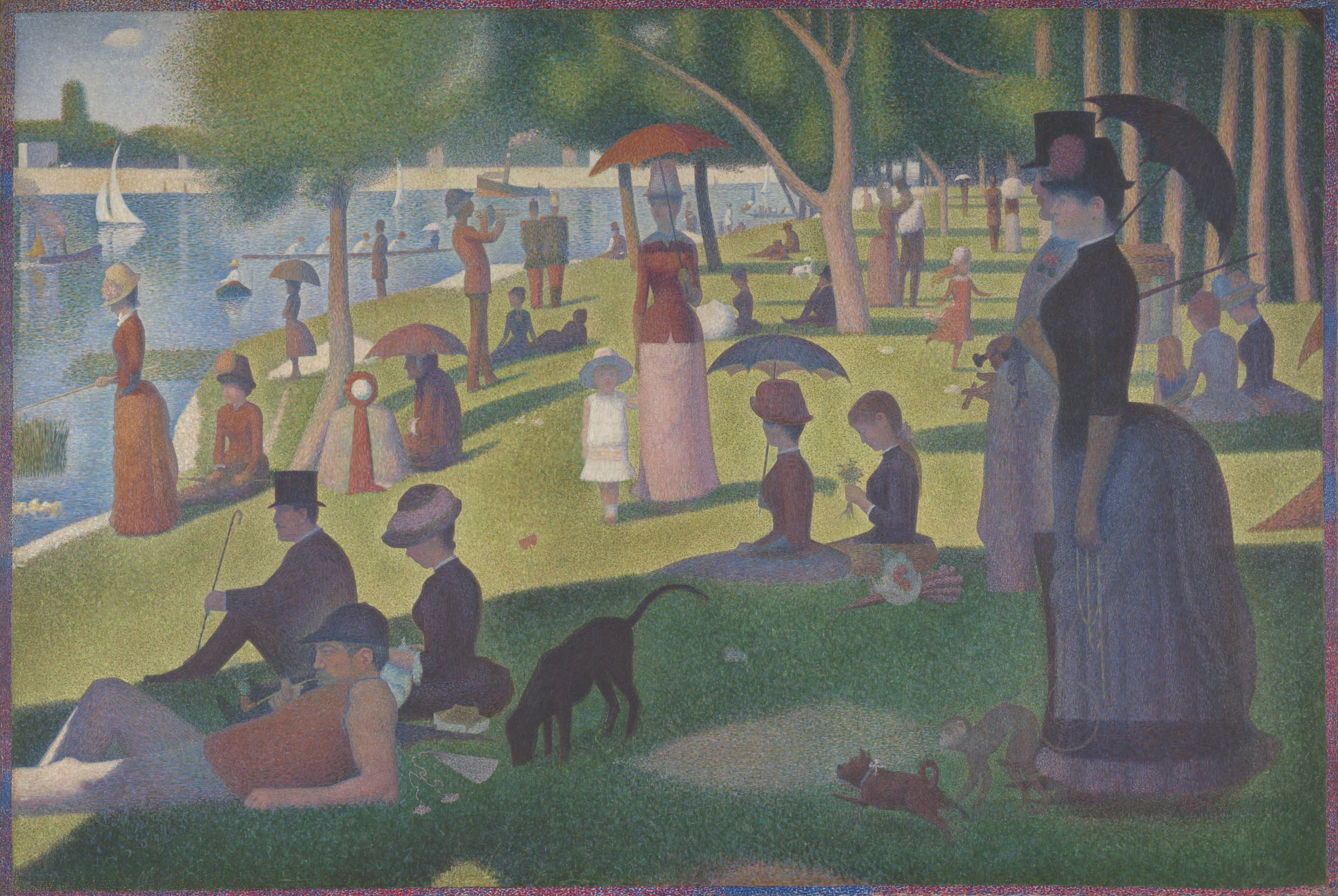
Pointillism was born in the 1800s by Georges Seurat and Paul Signac. They painted with pure color using tiny distinct dots, placed side by side relying on the viewer's eye to blend the dots at a distance. A blue dot placed next to a yellow dot, viewed from a distance, reads as green. Seurat called this chromoluminarism.
In the 1850s - 1900s the newspaper industry formalized dot-based reproduction. Halftoning converts a continuous photograph into a grid of dots of varying size or varying spacing.
World War II
The word Dither means "to tremble" or "to vibrate". Early analog computers used gears and servos to perform calculations. These machines suffered from stiction ( static friction ) that caused them to "stick" at certain positions, resulting in inaccurate readings.
Engineers discovered that adding a small, random vibrations ( noise ) to the system prevented stiction. This noise was called dither.
Digital systems & Computer Graphics
The same principle from analog systems was carried into digital ones. Early digital systems had limited bit depth ( they could only represent a small number of discrete values ). This caused quantization error. Researchers found that adding random noise before quantization spread the error out, making it perceptually less objectionable.
Early computer displays and printers had very limited color/tone palettes:
- 1-bit displays ( 1970s - 80s ): These were binary displays, pixels were either on or off. black or white.
- CGA ( 1981 ): 4 colors
- EGA ( 1884 ): 16 colors from a 64 color palette
- VGA ( 1987 ): 256 colors from a 262, 144 color palette
- Early printers were strictly binary. ink or no ink.
The problem
The real world shows millions from distinguishable colors in a scene. Representing a digital version of that kind of scene produced an image with banding ( harsh visible steps between color regions ).
Dithering sacrifices images sharpness to gain appearance of more colors.
The Mathematics
Quantization Error
There is a source image where each pixel has a value in a continuous range, [ 0.0, 1.0 ] We need to map this to a limited set of output levels. With 1-bit output, we have only two levels: [ 0, 1 ]
Basically we want to convert a continuous tone into a binary image.
Simple thresholding: If pixel ≥ 0.5, output 1; else output 0. This means a pixel at 0.45 in the source image gets mapped to 0, producing an error of +0.45, this is quantization error.
Dithering is supposed to preserve the information lost by distributing it spatially.
Solution 1: Ordered Dithering - Bayer Matrix
Bryce Bayer introduced ordered dithering using a threshold matrix. Instead of comparing every pixel against the same threshold 0.5, we compare each pixel against a position-dependent threshold from a tiling matrix.
The Bayer Matrix is a recursive matrix. The general recursion is as follows:
The matrix is designed so that the threshold values are spread as uniformly as possible across a canvas ( spatial tile ).
We start with a 2x2 Bayer matrix. It is the smallest grid that can express a meaningful spatial ordering of thresholds.
To build B_4, we apply the recursion to B_2. Each entry in B_2 generates a 2x2 block:
Each quadrant of B_4 corresponds to one entry of B_2, scaled by 4 and offset. The top-left quadrant is 4 * 0 + B_2, the top-right is 4 * 2 + B_2, the bottom-left is 4 * 3 + B_2, and the bottom-right is 4 * 1 + B_2.
The same recursion applied to B_4 produces B_8 ( 64 thresholds ), and applied again produces B_16 ( 256 thresholds ). Each level quadruples the number of thresholds while preserving the property that successive activations are maximally spread apart.
For a pixel at position (x,y):threshold = M[x mod n][y mod n]output = 1 if input > threshold else 0The order of activation follows the same pattern at every scale: topLeft → bottomRight → topRight → bottomLeft. This way each new pixel is as far away from the previous one as possible. In B_2 this means four positions. In B_4 the same logic applies within each quadrant and across quadrants, giving 16 positions that fill the grid as uniformly as possible.
Solution 2: Error Diffusion - Floyd-Steinberg
Instead of using a fixed threshold pattern , Robert Floyd and Louis Steinberg chose to propagate quantization error to neighboring pixels that have not yet been processed.
The algorithm scans left-to-right & top-to-bottom.
For each pixel (x, y):    old = image[x][y]    new = quantize(old)    image[x][y]  = new    error = old - new
    // distribute error to unprocessed neighbours    image[x+1][y  ] += error * 7/16    image[x-1][y+1] += error * 3/16    image[x  ][y+1] += error * 5/16    image[x+1][y+1] += error * 1/16
The diffusion kernel:    [ _ * 7 ]    [ 3 5 1 ] x 1/16where * is the current pixel and _ is already processed.
The weights ( 7, 3, 5, 1 ) sum to 16. The total error is always fully redistributed, never lost. The largest share ( 7/16 ) goes to the immediate right neighbor because it is closest and will be processed next. The bottom neighbors receive the rest, biased toward directly below ( 5/16 ) over the diagonals.
Because each pixel's output depends on accumulated errors from previously processed pixels, Floyd-Steinberg is inherently sequential. You cannot process pixels in parallel the way you can with ordered dithering.
Ordered vs Error Diffusion
The two approaches make different tradeoffs.
Ordered dithering ( Bayer )
- Each pixel is independent. You only need the pixel's value and its position in the threshold matrix. This makes it trivially parallelizable and ideal for real-time rendering.
- The repeating tile produces a visible grid-like texture, especially at small matrix sizes. At 2x2 you can clearly see the pattern. At 8x8 or 16x16 it becomes much finer and harder to notice.
- The output is deterministic and stable. The same input always produces the same output, and small changes in input produce small changes in output. This makes it well-suited for animation.
Error diffusion ( Floyd-Steinberg )
- The output looks more organic and natural. The error propagation breaks up regular patterns and distributes dots in a way that better follows the contours of the source image.
- Detail preservation is stronger. Fine gradients and edges are rendered more faithfully because the error carries information about what was lost.
- The sequential dependency means you cannot parallelize across pixels. For real-time use, this is the main cost.
- It can produce directional artifacts, sometimes called "worm-like" patterns, where the left-to-right scan direction creates visible streaks in certain tonal ranges.
In practice, ordered dithering is used when speed and consistency matter ( games, real-time effects, animation ). Error diffusion is used when quality matters more than speed ( print, static image conversion ).
Number of Tones
The size of the Bayer matrix directly determines how many distinct intensity levels you can represent.
An n x n Bayer matrix has n² threshold values. Combined with the two extremes ( all pixels on, all pixels off ), this gives n² + 1 reproducible tone levels:
| Matrix | Thresholds | Tone levels |
|---|---|---|
| 2x2 | 4 | 5 |
| 4x4 | 16 | 17 |
| 8x8 | 64 | 65 |
| 16x16 | 256 | 257 |
A 16x16 matrix with 257 levels closely approaches the 256 levels of an 8-bit grayscale image. At that point, the dithered output is nearly indistinguishable from a continuous tone to the human eye.
The tradeoff is that larger matrices need larger spatial tiles to express each tone. A 2x2 matrix repeats every 2 pixels, so fine spatial detail is preserved, but you only get 5 tones. A 16x16 matrix needs a 16-pixel tile to express its full tonal range, so fine detail is smoothed out, but the tonal resolution is much higher.
Tone Maps
Dithering operates on a source image. In the playground, instead of loading a photograph, the source is a procedural tone map: a mathematical function that returns a brightness value for every pixel, animated over time.
Flat returns a constant value across the entire canvas. It is useful for seeing the raw dithering pattern without any tonal variation.
Noise uses overlapping sine waves at different frequencies and orientations to produce a smooth, slowly shifting organic texture.
tone = ( sin(x * 0.1 + y * 0.15 + t * 0.7) * sin(x * 0.07 - y * 0.09 + t * 0.5) + 1 ) / 2Vortex converts to polar coordinates and creates a spiral pattern. The distance from center and the angle combine to produce concentric rings that twist over time.
dist = sqrt(nx² + ny²)angle = atan2(ny, nx)tone = sin(dist * 20 - angle * 3 + t) * 0.5 + 0.5Warp uses iterative domain warping. The x and y coordinates are repeatedly distorted by sine and cosine functions, each iteration feeding into the next. This creates the flowing, liquid-like shapes. The final value passes through a smoothstep function to control contrast.
for i in 1..5: sx += 0.6/i * cos(i * 2.5 * sy + t) sy += 0.6/i * cos(i * 1.5 * sx + t)tone = smoothstep(0.35, 0.85, 0.3 / |sin(t - sy - sx)|)Fabric simulates a woven textile by warping x and y coordinates with sine waves, then combining horizontal and vertical sine patterns. The two perpendicular wave families create the appearance of threads crossing over and under each other.
Implementation
The playground renders dithering in real time on an HTML canvas using requestAnimationFrame.
The rendering loop:
- For each cell in the grid, compute the source tone from the tone map function at that position and time.
- Add a per-cell flicker: each cell has a random phase, speed, and amplitude. A sine wave modulated by these values adds subtle variation, so the output feels alive rather than mechanical.
- Apply dithering:
- Bayer: compare the adjusted tone against the threshold from the matrix at that cell's tiled position. If the tone exceeds the threshold, the pixel is white; otherwise it takes the dot color.
- Floyd-Steinberg: quantize the tone to 0 or 1, compute the error, and distribute it to the right and bottom neighbors before processing them.
- Write the result into an
ImageDatabuffer and put it on the canvas in a single operation.
The Bayer matrix is generated recursively using the standard formula. The base case is the 2x2 matrix; each larger matrix is built by substituting the quadrant pattern [4B+0, 4B+2; 4B+3, 4B+1] from the smaller one.
Pixel size controls how many screen pixels each dithering cell occupies. At pixel size 1, each cell is one pixel. At pixel size 8, each cell is an 8x8 block of identical color, producing the chunky retro aesthetic. The grid dimensions scale inversely: a 500x400 canvas at pixel size 8 becomes a 62x50 dithering grid.